

Introduction
Software development has changed dramatically. Businesses today are expected to release applications faster, respond quickly to customer requirements, maintain high software quality, and continuously improve their digital products. Traditional development approaches, where development, testing, deployment, and operations work as separate stages, often struggle to meet these expectations.
This is where DevOps and automation become critical.
DevOps brings development and operations teams together around shared processes, responsibilities, and objectives, while automation reduces repetitive manual work across the software development lifecycle. Together, they create a more efficient, reliable, and scalable approach to building and delivering software.
For organizations pursuing digital transformation, DevOps automation is no longer simply a technical improvement—it is becoming a foundation for modern software delivery.
What Is DevOps?
DevOps is a combination of development (Dev) and operations (Ops) practices designed to improve collaboration, communication, and software delivery throughout the development lifecycle.
Instead of developers building an application and handing it over to operations at the end, DevOps encourages teams to collaborate from development through deployment, monitoring, and continuous improvement.
A typical DevOps lifecycle includes:
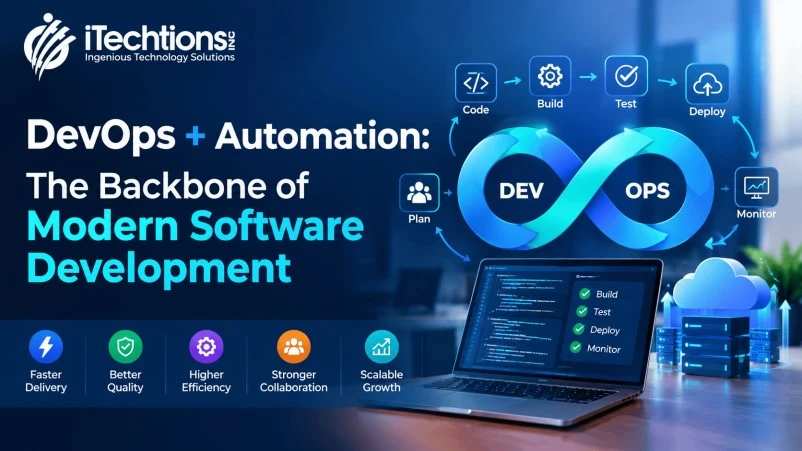
Plan → Code → Build → Test → Release → Deploy → Operate → Monitor
The process is continuous rather than linear.
This allows teams to identify problems earlier, release updates more frequently, and respond more quickly to changing business and customer requirements.
DevOps also works closely with practices such as Continuous Integration (CI), Continuous Delivery/Deployment (CD), Infrastructure as Code (IaC), automated testing, monitoring, and security automation.
What Is DevOps Automation?
DevOps automation involves using tools, scripts, workflows, and automated processes to perform repetitive tasks across the software development and deployment lifecycle.
Instead of relying on people to manually perform the same steps every time, automation allows predefined processes to execute consistently.
For example, when a developer commits code, an automated pipeline can:
-
Detect the code change
-
Build the application
-
Run automated tests
-
Perform code-quality checks
-
Identify security issues
-
Create deployment packages
-
Deploy the application to a testing environment
-
Run additional validation
-
Deploy to production when approved
-
Monitor the application after deployment
This creates a repeatable software delivery process while reducing manual intervention.
Why DevOps and Automation Work Better Together
DevOps establishes the culture and processes, while automation provides the technology and execution mechanisms that make those processes efficient at scale.
Think of it this way:
DevOps defines how teams collaborate.
Automation defines how repetitive work gets executed.
Without automation, DevOps teams can still end up spending significant time on manual deployments, testing, infrastructure configuration, monitoring, and routine operational tasks.
With automation, DevOps practices become faster, more consistent, and easier to scale.
Infrastructure as Code is a good example. Instead of manually configuring infrastructure, teams can define infrastructure through code and manage it through version control and CI/CD workflows. This makes infrastructure changes more repeatable and reduces configuration differences between environments.
Key Areas Where DevOps Automation Makes a Difference
1. Continuous Integration
Continuous Integration, or CI, allows developers to integrate code changes frequently into a shared repository.
Automated CI pipelines can automatically:
-
Build the application
-
Validate code
-
Run unit tests
-
Check dependencies
-
Perform static code analysis
-
Identify integration problems
This means problems can be identified earlier instead of accumulating until the end of a development cycle.
Early feedback is particularly valuable because smaller changes are generally easier to identify, troubleshoot, and fix.
2. Continuous Delivery and Deployment
After code has been successfully tested, DevOps automation can move it through different environments.
A typical workflow could look like:
Developer → Git Repository → Build → Automated Testing → Staging → Approval → Production
Depending on the organization’s requirements, deployment can be fully automated or require approval before production release.
Automating deployment reduces repetitive manual steps and helps create consistent release processes.
3. Automated Software Testing
Testing is one of the most important areas for DevOps automation.
Manual testing remains valuable for exploratory and scenario-based testing, but repetitive regression testing can consume considerable time.
Automated testing can help teams continuously validate:
-
Functional requirements
-
APIs
-
User interfaces
-
Regression scenarios
-
Performance
-
Security
-
Integration points
When automated tests are integrated into CI/CD pipelines, developers can receive feedback shortly after introducing a change.
This supports the DevOps objective of delivering software faster without treating quality as an afterthought.
4. Infrastructure as Code
Infrastructure as Code, commonly called IaC, allows infrastructure configurations to be managed similarly to application code.
Instead of manually configuring servers, networks, databases, and cloud resources, infrastructure requirements can be defined in code.
This provides benefits such as:
-
Repeatable infrastructure deployment
-
Version control
-
Consistent environments
-
Faster provisioning
-
Easier infrastructure changes
-
Reduced configuration errors
IaC is particularly useful when organizations operate multiple development, testing, staging, and production environments.
5. Automated Deployment
Traditional deployment processes may involve multiple manual steps and handoffs.
A DevOps automation pipeline can standardize these activities.
For example:
Code Commit → Build → Test → Security Scan → Package → Deploy → Verify → Monitor
Once the workflow has been configured and validated, teams can execute deployments more consistently.
This becomes especially important for organizations releasing software frequently or managing multiple applications.
6. Monitoring and Automated Feedback
DevOps does not end when software reaches production.
Applications need continuous monitoring to identify:
-
Performance problems
-
Availability issues
-
Infrastructure failures
-
Application errors
-
Security events
-
Unexpected traffic patterns
Monitoring and automated alerts create a feedback loop between production and development teams.
This helps organizations respond to issues faster and continuously improve their applications.
DevOps Automation and Microservices
Modern applications increasingly use microservices architectures, where an application is divided into smaller, independently deployable services.
Microservices can provide flexibility, but they also introduce operational complexity.
A single application may contain dozens or hundreds of services that need to be:
-
Built
-
Tested
-
Deployed
-
Scaled
-
Monitored
-
Updated
Automation becomes essential in such environments.
CI/CD pipelines can manage individual service deployments, while containerization and orchestration technologies can help teams package and operate applications consistently.
The iTechtions technology ecosystem already highlights technologies including Kubernetes, Docker, RabbitMQ, MuleSoft, Bamboo, Bitbucket, Azure, and SonarQube, which are commonly associated with modern application delivery, integration, infrastructure, and software quality workflows.
Benefits of DevOps + Automation
Organizations that implement DevOps automation effectively can achieve several important advantages.
Faster Software Delivery
Automating build, testing, and deployment activities reduces the time required to move software from development to production.
Improved Software Quality
Automated testing and validation help identify problems earlier in the development lifecycle.
Reduced Human Error
Manual processes can introduce configuration mistakes and inconsistent execution. Automation makes repeatable processes more consistent.
Better Collaboration
DevOps encourages development, operations, QA, security, and other teams to work toward shared objectives rather than operating in isolated silos.
Greater Scalability
Automated infrastructure and deployment processes make it easier to manage growing applications, workloads, and environments.
Improved Reliability
Repeatable deployment and infrastructure processes can reduce configuration differences and make releases more predictable.
Faster Recovery
Automated rollback, monitoring, and deployment workflows can help teams respond to failures more efficiently.
These benefits explain why automation is increasingly considered a core component of modern DevOps practices.
DevOps Automation Tools and Technologies
There is no single DevOps tool that fits every organization. The right technology stack depends on the application architecture, cloud environment, development methodology, security requirements, and business objectives.
A modern DevOps ecosystem may include:
|
DevOps Area |
Example Technologies |
|
Source Control |
Git, Bitbucket |
|
CI/CD |
Jenkins, Bamboo, GitHub Actions, GitLab CI/CD |
|
Containers |
Docker |
|
Container Orchestration |
Kubernetes |
|
Cloud |
Microsoft Azure, AWS, Google Cloud |
|
Code Quality |
SonarQube |
|
Infrastructure as Code |
Terraform, Ansible |
|
Monitoring |
Prometheus, Grafana |
|
Testing |
Selenium, Playwright, JUnit |
|
Integration |
MuleSoft, RabbitMQ |
The important point is not simply adopting more tools. The objective is to create an integrated delivery ecosystem where tools work together to automate the software lifecycle.
DevOps Automation vs. Traditional Software Development
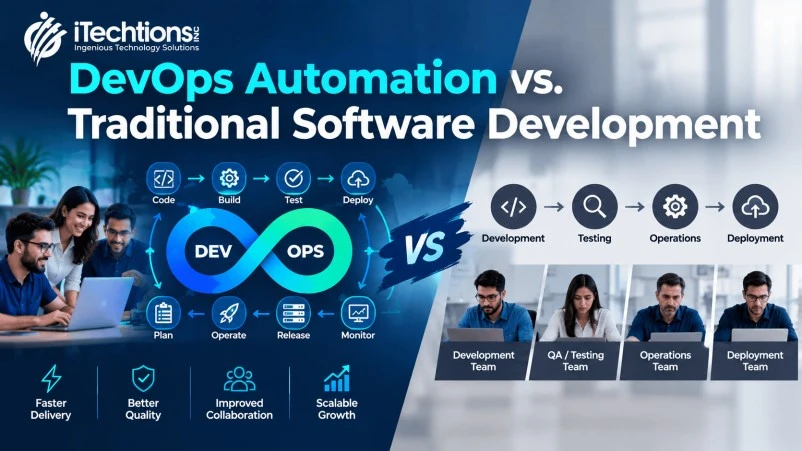
The difference becomes clearer when comparing the two approaches.
|
Traditional Development |
DevOps + Automation |
|
Development and operations often work separately |
Cross-functional collaboration |
|
Manual deployments |
Automated deployments |
|
Testing may happen late |
Continuous automated testing |
|
Manual infrastructure configuration |
Infrastructure as Code |
|
Large releases |
Smaller, frequent releases |
|
Manual monitoring |
Continuous monitoring |
|
Reactive issue resolution |
Faster feedback and proactive detection |
|
Environment differences |
More consistent environments |
The goal isn’t to eliminate people from software development.
Instead, automation allows technical teams to spend less time on repetitive operational tasks and more time on innovation, architecture, problem-solving, and business value.
DevOps, Automation, and Digital Transformation
Digital transformation is not simply about adopting new technology. It involves changing how organizations build, deliver, operate, and continuously improve digital products and services.
DevOps and automation support this transformation by creating a foundation for faster experimentation and continuous improvement.
For example, an organization introducing a new digital service may need to:
-
Develop new application features
-
Integrate multiple systems
-
Deploy cloud infrastructure
-
Test continuously
-
Monitor production
-
Scale according to demand
-
Respond to customer feedback
Doing all of this manually becomes increasingly difficult as the organization grows.
Automation creates repeatable processes that can scale with the business.
This aligns closely with iTechtions’ focus on digital transformation, Agile practices, DevOps culture, microservices, and automation.
How to Build a Successful DevOps Automation Strategy
Technology alone does not guarantee DevOps success.
Organizations should approach DevOps automation strategically.
Step 1: Identify Repetitive Processes
Start by identifying tasks that consume significant time and are repeated frequently.
Examples include:
-
Builds
-
Testing
-
Deployments
-
Environment provisioning
-
Configuration
-
Reporting
-
Monitoring
Step 2: Establish Version Control
Application code, infrastructure configurations, and automation scripts should be managed using appropriate version-control practices.
Step 3: Build a CI/CD Pipeline
Create a pipeline that automatically validates and moves code through the development lifecycle.
Step 4: Automate Testing
Integrate automated tests into the pipeline so that code quality is continuously evaluated.
Step 5: Automate Infrastructure
Use Infrastructure as Code where appropriate to make environments reproducible and manageable.
Step 6: Add Security
Security should be integrated throughout the pipeline rather than treated as a final checkpoint. This approach is commonly associated with DevSecOps.
Step 7: Monitor and Improve
Measure pipeline performance, deployment frequency, failures, recovery times, and other relevant metrics.
Then continuously improve the process.
Common Challenges in DevOps Automation
Although DevOps automation offers significant benefits, implementation can introduce challenges.
Tool Complexity
Organizations can end up with too many disconnected tools.
Solution: Build an integrated technology strategy rather than adopting tools independently.
Legacy Systems
Older applications may not easily support modern CI/CD or automation practices.
Solution: Start incrementally by automating specific processes and modernizing components over time.
Skill Gaps
DevOps requires knowledge across development, infrastructure, cloud, automation, security, and monitoring.
Solution: Invest in training, cross-functional teams, and experienced DevOps professionals.
Poorly Designed Automation
Automation can make a bad process execute faster without actually improving it.
Solution: Simplify and optimize the process before automating it.
Security Risks
Automated infrastructure and deployment pipelines require careful access control, secrets management, and security validation.
Solution: Integrate security controls into the DevOps lifecycle.
The Future of DevOps and Automation
DevOps automation continues to evolve as organizations adopt cloud computing, microservices, artificial intelligence, platform engineering, and increasingly sophisticated software delivery practices.
AI-assisted development and operations are also creating new opportunities for intelligent automation, including automated anomaly detection, predictive insights, code assistance, and operational recommendations.
However, the fundamental objective remains the same:
Build software faster, deliver it reliably, and continuously improve it.
The organizations that benefit most will not necessarily be those that use the greatest number of tools. They will be those that successfully combine people, processes, technology, automation, and a culture of continuous improvement.
Conclusion: DevOps + Automation Is the Foundation for Modern Software Delivery
Modern software development requires more than writing code.
Organizations need a reliable system for building, testing, deploying, monitoring, and continuously improving applications.
DevOps provides the culture and framework for collaboration, while automation provides the mechanisms for executing repetitive processes efficiently and consistently.
Together, they help organizations:
-
Accelerate software delivery
-
Improve application quality
-
Reduce manual errors
-
Increase deployment consistency
-
Scale operations
-
Improve collaboration
-
Respond faster to business requirements
For organizations undergoing digital transformation, DevOps and automation can serve as the backbone connecting development, operations, infrastructure, testing, security, and business objectives.
At iTechtions, digital transformation is supported through Agile practices, DevOps culture, microservices, automation, integration, analytics, cloud enablement, and technology consulting. The company’s approach focuses on aligning the right expertise and technology capabilities with each client’s transformation journey.
Ready to modernize your software delivery process? Explore how iTechtions can help your organization build a more automated, scalable, and future-ready technology environment.